


Every few years, an essay or a viral thread circulates online proclaiming the imminent death of JavaScript. We are told that a newer, shinier, or more structured technology has arrived to finally sweep away the web’s default language. First, it was browser plugins like Flash and Silverlight, then it was a wave of desktop-to-web source compilers, and now the headline-grabber is WebAssembly (Wasm). If you spend too much time reading technical message boards or scrolling through social media, you might think you need to abandon your frontend frameworks immediately and start rewriting your entire codebase in low-level systems languages. That is why the real conversation around JavaScript and WebAssembly should focus less on replacement and more on cooperation.
This constant cycle of alarmism creates unnecessary anxiety. That is especially true for self-taught developers, boot camp students, and hobby builders who are still trying to master the fundamentals of the web. You hear that WebAssembly is the future of web development, but the actual explanations are often buried in dense computer science jargon about stack machines, linear memory, and compiler backends. It is easy to feel like you are falling behind a shift you don’t even understand.
The reality of the web ecosystem is more practical than the hype suggests. JavaScript is not on its deathbed. It survives and thrives like a highly adaptable cockroach equipped with a massive package manager. WebAssembly is not an assassin sent to replace JavaScript. Instead, it is a specialized partner designed to work directly alongside it. It changes what we can expect browser applications to achieve, but it does so by extending JavaScript’s capabilities rather than eliminating them. That is why understanding JavaScript and WebAssembly together matters more than treating them like rival technologies.
Why JavaScript Still Owns the Front Door of the Internet
To understand why WebAssembly isn’t going to replace JavaScript for your everyday web applications, you have to look at JavaScript’s unique, deeply entrenched position inside modern web browsers. JavaScript isn’t just a language that happens to run on the web. It is the browser’s native scripting language for controlling interactive page behavior. It has a deeply entrenched role in the user experience that cannot be easily replicated or replaced by a low-level binary format.
Consider what a typical web application actually spends its time doing. It listens for user clicks, manages navigation bars, updates form fields, fetches data from a database API, and toggles visual themes. JavaScript handles these tasks exceptionally well because it has native access to the Document Object Model (DOM), which is the programming interface for the HTML and CSS elements on your screen. Frontend libraries like React, Vue, and modern TypeScript frameworks are completely built around this DOM-manipulation lifecycle.
WebAssembly, by deliberate architectural design, does not have direct, high-level access to the DOM out of the box. A .wasm file cannot directly change a paragraph tag, alter a background color, or attach an event listener to an HTML button without going through an intermediary layer. If a WebAssembly module wants to change something visual on a web page, it must send a message out to a JavaScript file, asking JavaScript to perform the actual DOM update on its behalf.
For the vast majority of web applications, including company dashboards, blogs, portfolios, and standard e-commerce platforms, moving your logic into WebAssembly would actually slow down development and introduce massive architectural bloat. JavaScript is already well suited for handling user interaction, rendering UI components, and managing application state. It remains the undisputed language of the web experience because it owns the entry point to the screen.
Demystifying the Binary: WebAssembly in Plain English
Let’s define WebAssembly without getting lost in the weeds of compiler theory. WebAssembly is a compact, low-level binary instruction format that modern web browsers can execute at near-native speed. It is not a programming language that you sit down and write line-by-line using standard text files, like you do with Python, PHP, or JavaScript. You will almost never open a code editor and type out raw WebAssembly code yourself.
Instead, WebAssembly is a compilation target. This means you write your application logic in a source language that excels at low-level performance and strict memory management, such as Rust, C, C++, Go, or AssemblyScript. Once your code is working locally, you pass it through a compiler toolchain that translates your human-readable text into a highly compressed, pre-parsed .wasm binary file that the browser can read instantly.
An analogy helps clarify how this relationship functions in practice. Think of JavaScript as the flexible, friendly project manager who speaks the local language of the web page. This manager is excellent at communicating with the layout, organizing basic tasks, responding to user requests, and adjusting the office scenery on the fly.
WebAssembly, on the other hand, is like bringing a highly specialized industrial computer into the office. The manager handles all the client communication, the paperwork, and the physical room layout, but when a massive pile of intensive math problems or heavy file processing arrives, the manager doesn’t try to solve it manually. They feed the raw data directly into the industrial machine, wait for it to process the load instantly, grab the clean output, and present it neatly to the client. The machine doesn’t replace the manager, it simply saves the manager from hitting a processing wall.
Where JavaScript Hits a Performance Wall
JavaScript is remarkably fast for a high-level scripting language, thanks to decades of engineering work poured into browser runtimes and Just-In-Time (JIT) compilation. Modern browser engines monitor your JavaScript code as it runs, identify hot spots that get executed repeatedly, and compile those sections into fast machine code in the background. But despite these incredible optimizations, JavaScript was never originally designed to handle intensive, low-level computational operations.
The fundamental limitation stems from how JavaScript manages data and memory. It is a dynamically typed, garbage-collected language. This means that when you run a script, the browser engine has to spend processing energy at runtime figuring out whether a specific variable is a string, a number, or an object. Furthermore, the engine must continuously scan your computer’s memory to find old variables that are no longer being used and safely clean them up.
This background maintenance creates minor, unpredictable pauses in execution. If you are building a standard CRUD app or a forms-based interface, these micro-pauses are completely invisible to the human eye. However, if you try to build a full-scale video editing suite, an intricate 3D design program, a real-time physics simulation, or a complex cryptographic engine inside a browser tab, those micro-pauses become a massive problem. They cause dropped frames, laggy inputs, and stuttering performance.
JavaScript can handle a surprising amount of work, but it is harder to make it behave predictably for workloads that need tight memory control, stable timing, and repeated low-level operations. This kind of performance ceiling is one major reason WebAssembly was created.
How JavaScript and WebAssembly Work Together
The relationship between JavaScript and WebAssembly is entirely cooperative. They operate inside the exact same secure browser sandbox, sharing resources and communicating across a structured bridge. JavaScript acts as the orchestration layer, while WebAssembly serves as a specialized performance engine.
When a user visits a hybrid web application, the browser downloads a standard JavaScript file first. This script fetches the compiled .wasm binary file from the server and initializes it. JavaScript uses native browser APIs to compile and instantiate the WebAssembly module, turning it into a collection of usable functions within your frontend environment.
Once this initialization is complete, your JavaScript file can call functions inside the WebAssembly module as if they were standard JavaScript operations. You can pass numbers, arrays, or text buffers into the WebAssembly container, let the compiled code execute its heavy processing loops at near-native speed, and catch the resulting data back in your JavaScript flow to update your application state.
This workflow is a textbook implementation of modular programming principles. Instead of trying to force your entire application into a single language paradigm, you isolate your performance-critical algorithms into dedicated, highly efficient binary modules. This keeps your primary codebase approachable, flexible, and integrated with modern frontend frameworks while ensuring that your application never chokes on heavy arithmetic.
A Simple Look at the Implementation Code
You do not need to understand systems programming or complex compiler configurations to see how this cooperation works in a browser script. The frontend implementation relies on standard asynchronous JavaScript promises to fetch and mount the binary module cleanly.
// Fetching and compiling a WebAssembly module on the fly
async function loadPerformanceModule() {
  try {
    // Stream the binary file directly from the server path
    const response = await fetch('/modules/analyzer.wasm');
    const buffer = await response.arrayBuffer();

    // Instantiate the raw bytes into usable JavaScript functions
    const wasmObject = await WebAssembly.instantiate(buffer);

    // Extract the compiled functions exported by the Wasm module
    const { compute_heavy_data } = wasmObject.instance.exports;

    // Execute the performance-heavy calculation safely
    const calculationResult = compute_heavy_data(1500000, 4200000);
    console.log("Output directly from WebAssembly:", calculationResult);

    // Use standard JavaScript DOM manipulation to update the UI
    const outputElement = document.getElementById('result-display');
    outputElement.innerText = `Calculated Total: ${calculationResult}`;

  } catch (error) {
    console.error("Could not initialize the WebAssembly module:", error);
  }
}

loadPerformanceModule();
This code snippet demonstrates the clear boundaries between the two environments. JavaScript handles the network request, manages the asynchronous file loading, catches any runtime errors, and executes the final DOM update on the page layout. The WebAssembly module remains a silent, performance-focused engine that receives data, performs its pre-compiled routine, and returns the clean result back to the main script.
In real production code, you may also see developers use WebAssembly.instantiateStreaming() instead of manually converting the response into an ArrayBuffer. That streaming approach can be more efficient because the browser can compile the module while it downloads. For a beginner-friendly example, though, the fetch() → arrayBuffer() → WebAssembly.instantiate() flow makes the loading process easier to see step by step.
A Practical Look at an Image Optimization Pipeline
To make this hybrid relationship tangible, let’s look at a practical application: a browser-based image optimization tool. Imagine a utility where a developer drops a massive smartphone photograph onto a webpage to compress it, resize it, and strip out its metadata before uploading it to a cloud server.
If you build this entire application with standard browser JavaScript running on the main UI thread, the user experience will quickly degrade. Processing a high-resolution grid of millions of individual pixels requires intense, repetitive loops. Because most UI JavaScript runs on the browser’s main thread, heavy pixel-processing work can still lock up the page if you do not move it into a worker or a dedicated processing pipeline. The upload animation may freeze, the cancel button may stop responding, and the browser might even pop up a warning window telling the user that the web page has crashed.
In a modern hybrid setup, you split the responsibilities down the middle based on what each tool does best. JavaScript manages the user interface and the interactive elements. It runs the drag-and-drop zone, listens to the file upload event, animates a smooth progress bar, and reads the slider inputs where the user adjusts the quality percentage.
The millisecond the image file is dropped, JavaScript reads the raw file bytes and passes them over the bridge into a WebAssembly module compiled from an established C++ or Rust compression library. WebAssembly loops through the pixel data at near-native performance, avoids much of the JavaScript runtime overhead that can make heavy processing less predictable, and hands the optimized file bytes right back. The user interface remains responsive, the progress animation stays fluid, and the heavy engineering work happens silently behind the scenes.
Heavy Machinery vs Everyday Hand Tools
Determining whether your project actually needs WebAssembly comes down to understanding the nature of your engineering problem. WebAssembly is an incredible asset when you are building applications that require intense mathematical computing, real-time data processing, or the porting of mature desktop software directly to the browser.
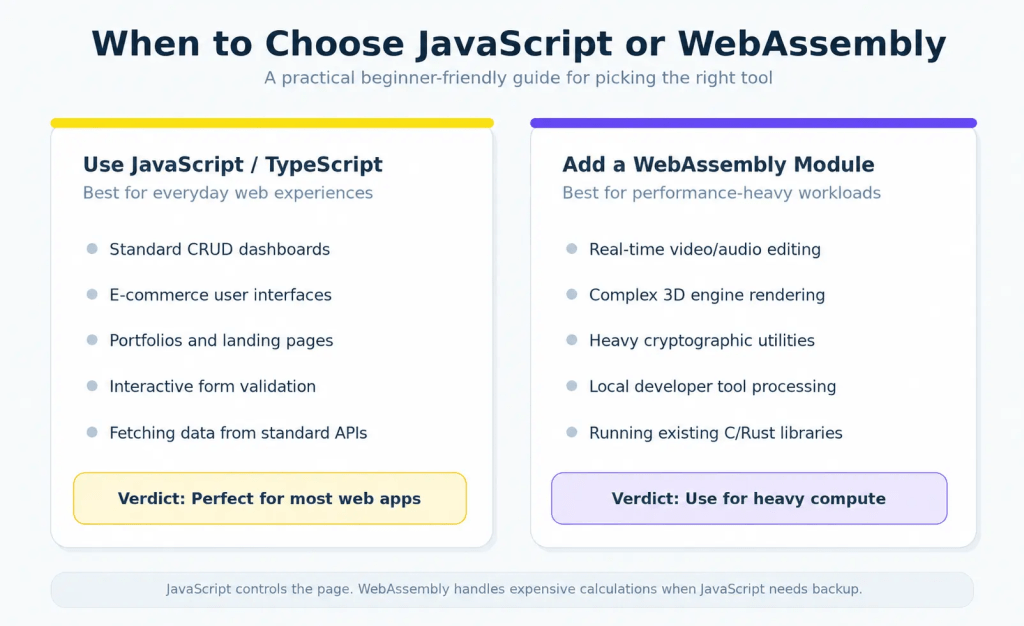
Browser games built with professional game engines can use WebAssembly to execute heavy physics, graphics, and simulation code directly inside the browser tab without relying on old third-party runtime plugins. Design tools like Figma helped prove that complex, desktop-grade creative software can run smoothly on the web, with WebAssembly playing an important role in performance-sensitive parts of that kind of workload. It is also highly effective for client-side audio processing, scientific simulations, local data-parsing utilities, and browser-based emulators.
Conversely, adding WebAssembly to a standard web project is almost always an exercise in over-engineering. If you are building a standard web app that spends most of its time rendering text, talking to databases, and displaying styled components, WebAssembly is complete overkill. Forcing a binary compilation pipeline into a traditional layout adds massive build complexity, increases initial download sizes for your users, and slows down your development cycle for zero noticeable performance gain. JavaScript or TypeScript is already the best tool for those jobs.
Chasing Shiny Compilers Before Mastering the Basics
There is a major beginner trap surrounding WebAssembly that is continuously amplified by online hype and AI-assisted programming tools. When you are constantly bombarded with articles declaring that a technology is the absolute future of an industry, it is incredibly easy to develop a fear of missing out. You start to assume that your current study path is obsolete, so you abandon your JavaScript and React tutorials to jump straight into learning low-level memory allocation, Rust compilation, and WebAssembly tooling.
This is a dangerous distraction that almost always leads straight into tutorial hell. If you still find yourself struggling with core JavaScript concepts, such as handling asynchronous execution chains, manipulating the DOM, understanding modular module imports, or managing application state. WebAssembly will not save you. In fact, it will only confuse you further by adding a layer of complex build steps on top of code you haven’t fully internalized yet.
Do not try to learn how to tune an industrial racing engine before you know how to steer the car down a normal street. The modern web still runs on HTML, CSS, and JavaScript. Understanding how data moves between an API endpoint and a visual user interface is a foundational skill that remains relevant regardless of how fast binary runtimes become. Focus on building clean, functional applications with standard web tools first.
Why JavaScript and WebAssembly Point to a Hybrid Web
So, what does the realistic future of web development actually look like? It doesn’t look like an ecosystem where developers throw away their text editors and stop writing JavaScript. Instead, the future is increasingly hybrid, expanding our collective understanding of what a web application is capable of doing.
We are moving into an era where highly complex, desktop-grade software can transition completely into the browser environment. Programs that once required a native installer file, specific operating system versions, and massive local hard drive storage footprints can now open instantly inside a secure browser tab on any computer. This lowers the friction for users and standardizes application distribution across Windows, Mac, Linux, and mobile devices alike.
This evolution opens up incredible opportunities for creative builders, but it preserves the fundamental architecture of the frontend experience. JavaScript will continue to govern the visual presentation layer, handle user routing, manage frontend state frameworks, and serve as the main language developers use to piece together their application layouts. WebAssembly will simply be there as an accessible power tool, waiting quietly in your toolkit until you encounter a performance problem heavy enough to justify using it.
Use WebAssembly When the Problem Actually Needs It
JavaScript is not dying, and WebAssembly is not a magical silver bullet that solves every web performance issue by default. They are entirely different technologies designed to solve entirely different problems within the exact same browser sandbox. True development wisdom lies in choosing your stack based on the actual needs of your project, rather than chasing every trend you see discussed on developer forums.
Keep practicing your JavaScript deeply, learn how to organize your files cleanly into independent modules, and focus on mastering core problem-solving structures. When you eventually start building an application that pushes past the computational boundaries of the browser, WebAssembly will be right there, ready to take on the heavy lifting. Until then, keep your stack simple, keep building real projects, and let performance problems, not hype, decide when WebAssembly belongs in your toolkit.